Digital advent calendars and advent calendar games
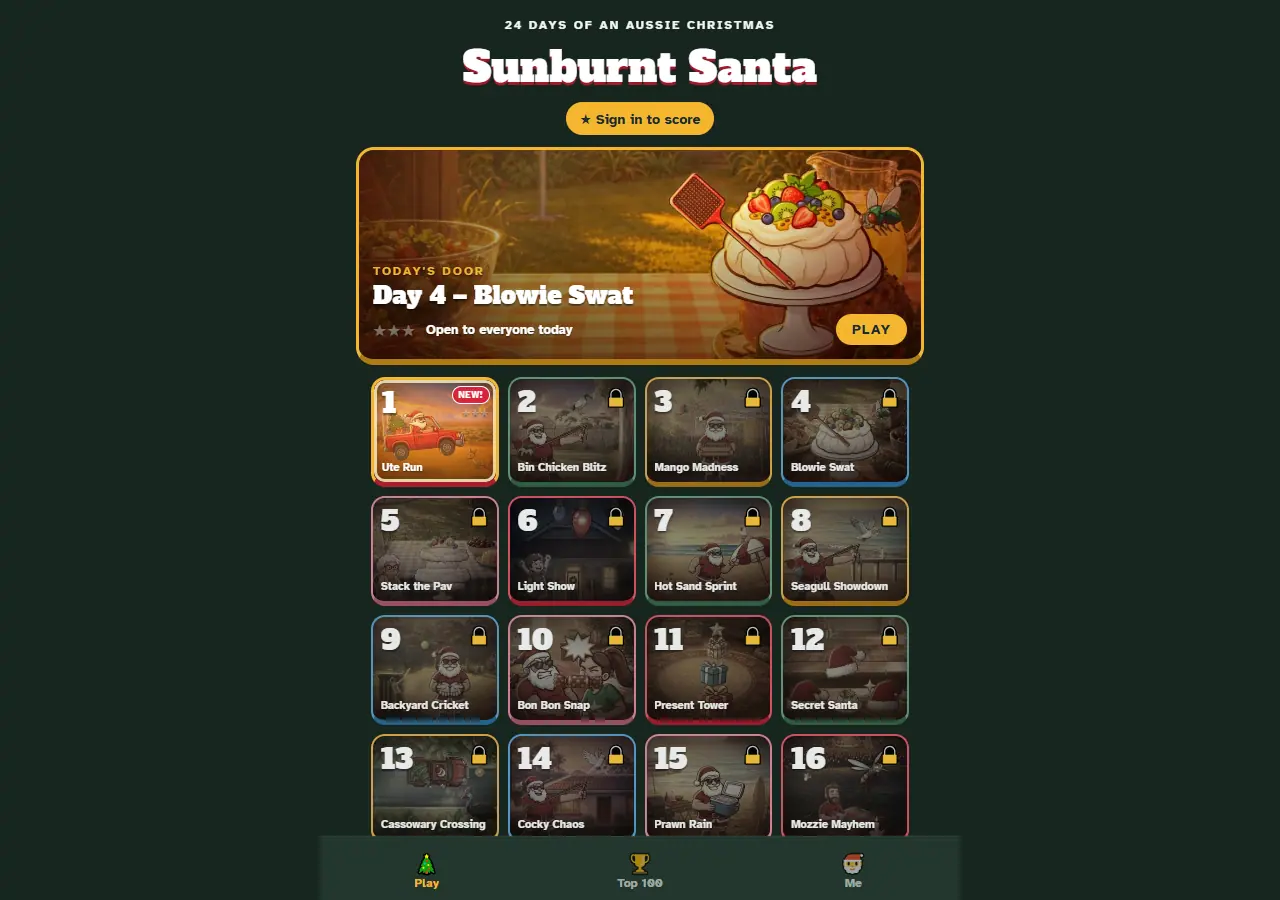
A digital advent calendar is an advent calendar on a screen: an app or web page with a door for each day of December that only opens on its day, with a picture, a video, a puzzle or a game behind it. An advent calendar game is the version where every door hides something you play, so the countdown to Christmas becomes a small daily game.
The idea is the same one German families had with chalk marks and paper doors (the short history of the advent calendar covers that). The screen just changes what can be behind the door, and adds a few things worth checking before you or your kids pick one.
How a digital advent calendar works
Almost all of them share three rules:
- One door a day. A door opens on its date, usually from 1 to 24 December, the same range as most paper calendars [4]. Some run to 25 December, and a few count from the first Sunday of Advent.
- No peeking. The calendar checks the date, either from your device's clock or from a server, and keeps future doors shut.
- Something to come back for. What sits behind the door is the whole point: a scene, a carol, a recipe, a story chapter, a discount, or a game.
Where they differ is in what happens if you miss a day, whether you need an account, and how they're paid for.
The main types
| Type | What's behind each door | Good for | Watch for |
|---|---|---|---|
| Picture and story calendars | An illustration, animation or short story chapter | Young kids, a calm daily ritual | Little to do once the door is open |
| Greeting-card calendars | Animated scenes, often with small games, sent as a gift | Sending to family far away | Often paid; check the price before you send |
| Brand and shop calendars | A daily deal or discount code | Shoppers | They're advertising; expect sign-ups and marketing emails |
| Puzzle calendars | A daily puzzle, riddle or coding challenge | Teens and adults who like a brain teaser | Some get hard fast |
| Game-a-day calendars | A different mini-game behind each door | Families, casual players, friendly rivalry | Ads, in-app purchases, account requirements |
Game-a-day calendars are the newest and the most varied. Some put one game in a festive frame and change the level each day; others, like ours, build a different little game for every door.
What to look for before you pick one
Free, paid, or "free with..."
"Free" can mean several things: free with ads, free with optional purchases, free for a few doors then paid, or free because it's selling you something else. None of these is wrong, but it's worth knowing which one you've got before December starts. The app store listing will show "In-app purchases" if there are any.
Ads
If a calendar is free and isn't a shop's promotion, ads are often how it pays its way. Look at where they appear: a banner under the calendar is very different from an ad in the middle of a round. Australia's eSafety Commissioner notes that gambling ads are common in free games and gaming-related apps, and suggests parents report ads targeting children to the ACMA [3].
In-app purchases and kids
eSafety's advice for families is practical: set parental controls so purchases need approval, keep the app store password to yourself, don't save card details on the device, and talk with kids about pausing before they buy something [3]. It also warns that some games block progress until you pay, and that these tactics can be hard for children to spot [3]. A good advent calendar game shouldn't need a purchase to open tomorrow's door.
Privacy
Before you install, check the store's privacy summary:
- On the App Store, the App Privacy label sorts an app's data into "Data Linked to You", "Data Not Linked to You" and "Data Not Collected", and lists what it's used for, such as advertising, analytics or app functionality [1].
- On Google Play, the Data safety section shows what an app collects and shares, its security practices, and whether you can ask for your data to be deleted. Tap the app, find the "Data safety" heading and tap "See details" [2].
Also ask: can you play without an account? If you do sign up, can you delete your account later, from inside the app?
Catching up
Life happens in December. Check what the calendar does if you miss a day or start late. Some keep missed doors open, some lock them for good, and some let you open them for a price.
Offline play
If the calendar is going on a long drive or a flight, check whether doors work without a connection. Many need the internet to check the date or load the content behind each door.
Will it still be fun on day 20?
A calendar that's delightful on 1 December can be a chore by the 20th. Games help here, especially ones with a score to beat or someone to beat it with.
How Sunburnt Santa's calendar works
Sunburnt Santa is a free advent calendar game made by vibe_dm, a one-person studio in Yungaburra, Far North Queensland. Behind its 24 doors are 24 different Aussie Christmas mini-games, each about a minute long, from dodging roos in Santa's ute to stacking a pavlova before Nan notices. Here's exactly how the calendar works, warts and all:
- Your calendar starts the day you first open it. Door 1 opens that day, door 2 the next, and so on. Dates follow Sydney time.
- Play a door to open the next. Each door is playable once you've played the one before it. You can replay any open door as often as you like.
- December catch-up. From 1 to 24 December, every door up to that date is open, so someone who starts on 10 December can play doors 1 to 10 straight away.
- After Christmas Eve, all 24 stay open.
- Today's Door. The big door at the top of the calendar is that day's game, with its own daily leaderboard.
- Stars are for fun. Each level has three stars for target scores. They don't lock any doors, but collecting at least one star on more doors opens six bonus games: Santa Smash after 4 starred doors, Christmas Light Smash after 8, Chimney Drop after 12, Snap! after 16, Present Spin after 20 and Santa Pinball after 24.
- No account needed. Guests can play everything. Signing in (13 and over) is optional; it's what puts your scores on the leaderboards. Guest scores stay on the phone.
- Ads. On iPhone and Android there's a banner under the calendar and a full-screen ad after every few finished rounds, never during a round; an optional one-off purchase turns them off. The web version has no ads.
- Privacy. Guests play without giving a name or email, and signed-in players can delete their account from inside the app.
There's a door-by-door overview on the advent calendar game page.
A door a day, Aussie style
If you'd like to try a game-a-day calendar, door 1 of ours is Ute Run: Santa has swapped the sleigh for a red ute, the tree's in the tray, and the outback road is full of roos. It's free on iPhone, Android and the web, and it's the same old advent calendar idea underneath: one small thing to look forward to each day until Christmas.
Keep reading
- What is an advent calendar? A short history
- Christmas traditions around the world: 35 countries, region by region
Sources
- App privacy labels, Apple
- Understand app privacy & security practices with Google Play's Data safety section, Google Play Help
- How to manage money in games, eSafety Commissioner (Australian Government)
- What is Advent and why do we celebrate with calendars?, National Geographic